

Virtual Branch (Online Banking)
Access Your Account from Any Device
Access your checking account 24 hours a day, 7 days a week from anywhere you can take a phone or laptop. Go to utahheritagecu.org and use the login button. Get more information on our new Virtual Branch here.
Virtual Branch Features
- Online Banking with more control of your money
- Better communication with UHCU
- Bill Pay
- More time saving features
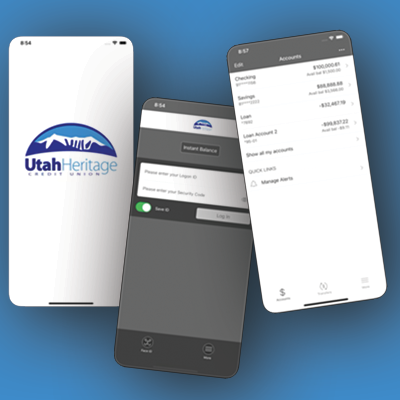
Mobiliti (Mobile Banking)
Access Your Account 24/7 from Your Smart Phone with Mobiliti.
Download Mobiliti, our mobile app. It’s easy:
1. Go to your app store on your phone
2. Look for this app to download

3. Follow the instructions on your phone.
4. FOR FIRST TIME APP USERS: ALL members must first enroll in our new Online Banking. If already enrolled, continue to the app login.
Download by clicking a link below:

Mobiliti Features
- Better control of your money
- Better communication with UHCU
- Same features as Virtual Branch but from the convenience of your smart phone.



Electronic Statements
Quick, Convenient and Secure Access to Your Statements!
Getting your statements online is a good first step to saving the planet. It eliminates paper and will likely save a tree or two. Besides the positive environmental impact, you can get your statement whenever you need it and you’ll have a lot less clutter around the house.
Next Step
Login and sign up for e-statement within Virtual Branch (Online Banking).

Paying Your Bills has Never Been Easier
It’s too easy!
Paying your bills can’t get much easier than our most convenient service, online bill pay! With Bill Pay there are no more checks to write and no need for a stamp! It’s free with a checking account and setting up your bills to pay automatically couldn’t be easier.
Online Bill Pay Features
- Pay recurring bills like utilities, mortgage and credit cards
- Pay one-time bills
- Schedule when you want payments made
- Review payment history
- It’s free with your checking account
- Never miss another payment by scheduling payments when they’re due
- Save postage
Next Step
Login and sign up for Virtual Branch (Online Banking).

Direct Deposit
Get Immediate Access to Your Paycheck!
Getting direct deposit of your paycheck from your employer is the best way to get your money into your account immediately and without holds. It’s so convenient that generally, even your employer prefers it.
Check with your employer to see if they offer direct deposit. If they do, you will need the following:
- UHCU’S Routing number – 324377338
- Your account number at UHCU
Next Step
- Sign up with your employer.
- If you have any problems or questions, please call the Credit Union at 435-436-8288.

Wire Transfers
Generally Same Day Guaranteed Funds!
Wire transfer services allow you to send and receive guaranteed funds to companies or individuals.
How to Send a Wire Transfer
To send a wire transfer, visit your nearest Utah Heritage Credit Union branch. Fees for wire transfers are:
- Domestic Wire Transfer – $20
- 2:30 p.m. deadline for same-day transfers
If you have any problems or questions please contact the Credit Union at 435-436-8288.
How to Receive a Wire Transfer
To receive a wire transfer, please provide the following information to the business or individual sending the wire.:
- Alloya Corporate Credit Union
184 Shuman Boulevard, Suite 400
Naperville, IL 60563 - Wire Routing / Transit Number: 271987635
- Further Credit to:
Utah Heritage Credit Union
84 West Main
Moroni, UT 84646 - Wire Routing / Transit Number: 324377338
- Final Credit To:
Your Name and Account Number
Specify Checking or Savings Account
Download Incoming Wiring Instructions

Online Loan Payment with Your Debit Card
The Convenient Way to Pay Your Loan or VISA Payment
We have partnered with ProPay to securely process online payments to your UHCU loans. Payments may be made using a debit card or eCheck. (Payments may not be made with a credit card).
- Convenience fee of $4.95 on all debit card or eCheck transactions.
- Payments only apply to UHCU loans and will be effective only after the transaction has been validated.
- Loan payments made outside of business hours or on weekends or holidays will be effective the next business day.
- Please retain a copy of the supplied receipt page or email as proof your transaction was approved.
Next Step
Go online and make a loan payment using any Debit Card by clicking the link below.


Mobile Wallets
Going digital is fast and convenient with enhanced security and global acceptance!
Add your Utah Heritage Credit Union VISA Cards to your Digital Wallet!
There’s no need to use a physical card, check or cash. Securely make purchases with your smartphone or smart watch when you add your UHCU debit or credit cards to your mobile wallet.
Using a Mobile Wallet
It’s quick and easy. Open your mobile wallet and hold your phone to an in-store payment terminal.

How to Set Up Google Pay
Install the Google Pay app from “Google Play” and add your Utah Heritage CU VISA. Then follow the instructions. You can get additional information at https://pay.google.com/about/ Any question? Give us a call and we’ll walk you through the process.
How to Set Up Apple Pay
Open the “Wallet” app and add your Utah Heritage Credit Union VISA number. Just follow the instructions. You can get additional information at http://www.apple.com/apple-pay/where-to-use-apple-pay Any question? Give us a call and we’ll walk you through the process.